📡 Communication Protocols
In Active Directory there are plenty of protocols that are used to communicate machines between them. They can be used to pivot across the network and get command execution machines in different computers of the environment, so it is important to be aware of their purpose and the capabilities they offer.
You can check the ports required by Windows services in the Microsoft docs.
So let's review them.
SMB
SMB (Server Message Block) is a protocol widely used in Active Directory networks (and any other Windows network) to share files and communication between machines, usually Windows machines.
Each Windows machine by default allows connections to it by using the SMB protocol. Originally, SMB works over NetBIOS (datagram and session services) but nowadays it can be used directly over TCP. The Windows computers have the port 445/TCP open to handle SMB connections.
                             .--------
                            |
                            |
                          .---
               .--NBSSN-->| 139
               |          '---
     .-----.   |            |  Windows
     | SMB |>--|            |
     '-----'   |            |  machine
        |      |          .---
        |      '---TCP--->| 445
        |                 '---
        |                   |
        |                   |
        |                   '--------
 .------------.
 |            |
.------. .----------. | NTLM | | Kerberos | '------' '----------'
SMB and related protocols/ports
As an attacker is useful to know about SMB since is used to create shares which can contain valuable information and can be used to exfiltrate information from machines.
Shares
Shares are like folders that a machine shares in order to be accessed by other computers/users in the network. You can list the shares by using the net view command, the Get-SmbShare Powershell Cmdlet, or smbclient.py.
C:\> net view \\dc01.etherdrake.local /all
Shared resources at \\dc01.etherdrake.local

Share name  Type  Used as  Comment

-------------------------------------------------------------------------------
ADMIN$      Disk           Remote Admin
C$          Disk           Default share
IPC$        IPC            Remote IPC
NETLOGON    Disk           Logon server share
SYSVOL      Disk           Logon server share
The command completed successfully.
Shares of the domain DC
You can access to the shares of other computers in similar way that you would access a folder in your local machine. For accessing a share, you can use the a UNC path like \\dc01.etherdrake.local\SYSVOL\ or map the remote share to a local device by using net use command.
To refer to the target computer in the UNC path, you can use its dns name or its NetBIOS name. For example net view \\dc01.etherdrake.local or net view \\dc01.
C:\> dir \\dc01\sysvol
 Volume in drive \\dc01\sysvol has no label.
 Volume Serial Number is 609D-528B

 Directory of \\dc01\sysvol

28/11/2020  11:02    <DIR>          .
28/11/2020  11:02    <DIR>          ..
28/11/2020  11:02    <JUNCTION>     etherdrake.local [C:\Windows\SYSVOL\domain]
               0 File(s)              0 bytes
               3 Dir(s)  20,050,214,912 bytes free
List folders inside a share
Shares are very useful for users in order to access to files of other machines without really need to worry about using an special program or something like that. Hence, they are also very practical for attackers to move files from one computer to another in order to exfiltrate them.
Creating a shared that can be accesed by everyone
Default shares
You may notice previously that there are some shares that finished with $. These shares are C$, ADMIN$ and IPC$ and they are present by default in any Windows computer.
In order to access to C$ and ADMIN$ you are required to have Administrator privileges in the target computer. With these shares (specially C$) you can inspect all the computer files. Actually, these shares are used by several tools. For example, PsExec uses ADMIN$ to deploy a binary on charge of executing the given command.
The IPC$ shared is an special shared used to create named pipes.
Default domain shares
Apart from the common shares, in a domain, the Domain Controllers also publish the SYSVOL and the NETLOGON shares that are available for any user/computer in the domain. They are used to store files that need to be accessed by all the machines (at least Windows machines) of the domain.
The SYSVOL share is commonly used to store the Group Policy templates used by the computers to read the Group Policies deployed in the domain. Sometimes these policies contains passwords. You can access to the SYSVOL share with the \\<domain>\SYSVOL UNC path.
PS C:\> dir \\etherdrake.local\SYSVOL\etherdrake.local

    Directory: \\etherdrake.local\SYSVOL\etherdrake.local


Mode                 LastWriteTime         Length Name
----                 -------------         ------ ----
d-----        19/04/2021     17:12                Policies
d-----        28/11/2020     10:02                scripts
List SYSVOL folders
The \\<domain>\\SYSVOL\<domain>\scripts policy is an alias for the NETLOGON share. The NETLOGON share is used to store the logon scripts that need to be executed for the computers of the domain.
Named pipes
The IPC$ share is not a directory, but it is used to create named pipes, that allow processes of different computers interact between them with mechanisms like RPC (Remote Procedure Calls).
Named pipes can be seen as TCP ports that allows machines communicate between them, but inside of the SMB protocol. They are used to do RPC calls, allowing a lot of protocols to communicate over SMB.
Usually the protocols that work over the RPC/SMB stack defines a known named pipe that can be used to contact with the remote service (same idea as TCP/UDP ports). For example, RPC uses the \pipe\netlogon named pipe to exchange the messages of the Netlogon protocol.
HTTP
HTTP (Hypertext Transfer Protocol) is probably the most famous application protocol out there, since it is the protocol of the web. But apart from its major role in Internet, is also commonly used in Active Directory.
HTTP is used as transport protocol by many other application protocols that are present in a Active Directory domain like WinRM (and thus Powershell Remoting), RPC or ADWS (Active Directory Web Services).
                             .----------
                             |
                           .---
                  .------->| 80 HTTP / WebDAV
                  |        '---
                  |          |
                  |          |
                  |        .---
                  |------->| 443 HTTPS / WebDAV / PSWA
                  |        '---
                  |          |
                  |          |
                  |        .---
                  |------->| 593 RPC over HTTP Endpoint Mapper
                  |        '---
    .---------.   |          |
    | HTTP(S) |>--|          |
    '---------'   |        .---
         |        |------->| 5985 WinRM HTTP
         |        |        '---
         |        |          |
         |        |          |
         |        |        .---
         |        |------->| 5986 WinRM HTTPS
         |        |        '---
         |        |          |
         |        |          |
         |        |        .---
         |        '------->| 9389 ADWS (on DCs)
         |                 '---
         |                   |
         |                   '----------
  .-------------.
  |             |
.------. .----------. | NTLM | | Kerberos | '------' '----------'
Ports used by HTTP services in Active Directory
In order to be fully integrated with Active Directory, HTTP supports authentication with both NTLM and Kerberos. This is important from a security perspective since it implies that HTTP connections are susceptible of suffering from Kerberos Delegation or NTLM Relay attacks.
In the case of NTLM relay is specially important to note that HTTP connections don't required signing, so are very susceptible to NTLM cross relay attacks. In fact, there are many attacks like the PrivExchange or some Kerberos RBCD computer takeover that rely in NTLM relay from HTTP to LDAP. If you able to coerce a computer to perform an HTTP request using the computer domain account with NTLM authentication , then you can compromise the computer with a little of Kerberos RBCD magic.
Related to HTTP, in Windows machines you can install the IIS web server, that is the basis for some technologies like WebDAV or PSWA (Powershell Web Access), that can be enabled in the /pswa endpoint.
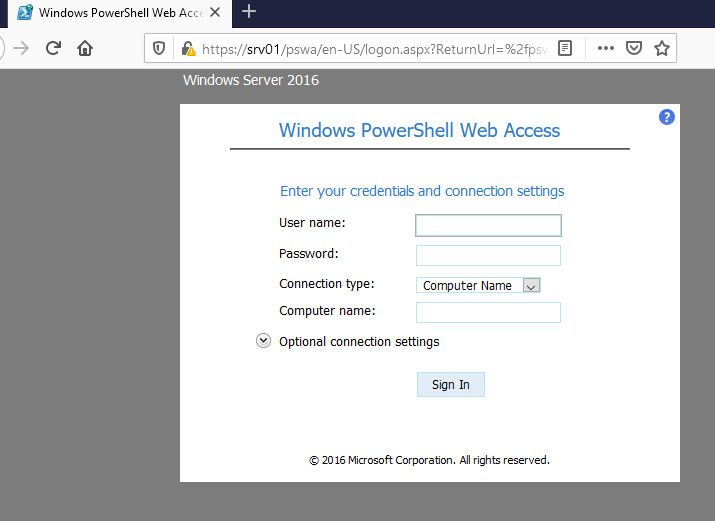
PSWA login
Moreover, you can create a SOCKS proxy over HTTP in a IIS installation by using pivotnacci.
RPC
RPC (Remote Procedure Call) is a protocol that allows programs from different machines communicate between them by calling functions over the network. Microsoft have developed a RPC protocol called MSRPC, that is a modified version of DCE/RPC with some extensions (defined in RPCE).
MSRPC can use different protocols for transport, like:
-
TCP, by using the port 135 for the Endpoint Mapper and ports from 49152 to 65535 as endpoints
-
SMB by using the named pipes
-
NetBIOS
-
HTTP, by using the port 593 for the Endpoint Mapper and ports from 49152 to 65535 as endpoints
                                         .---
     .----->----------->---------------->| 135 Endpoint Mapper
     |                                   '---
     |
     |                       .-------.   .---
     |----->------------.--->| NBSSN |-->| 139
     |                  |    '-------'   '---
     |                  ^
.-----. | .-----. | .--- | RPC |>----|----->| SMB |>----'--------------->| 445 '-----' | '-----' '--- | | | | | | .------. .--- | |----->---|------->| HTTP |>--.---->| 593 Endpoint Mapper | | | '------' | '--- | | | | v | | | | | .--- | '----->---|------->---|-------'---->| 49152 - 65535 | | | '--- | | | '-----------------.'-----------'
                  |
            .-----'-----.
            |           |
         .------.  .----------.
         | NTLM |  | Kerberos |
         '------'  '----------'
RPC related protocols and ports
In a domain, MSRPC is constantly used by computers to communicate between them. Windows machines use MSRPC for a lot of different tasks, such as manage the services or read the registry of other machines.
RPC is also widely used to communicate programs in the local machine through LRPC (Local RPC) or ALPC (Advanced Local Procedure Call).
For perform all those tasks, Microsoft have define several MSRPC interfaces, that define different functions, which allows to query/call different services of the computer from a remote program.
Each interface is identified by a UUID (Universally unique identifier) like 12345778-1234-ABCD-EF00-0123456789AB, and for each interface different endpoints are used. Several interfaces have predefined endpoints, such as named pipes. For example, the Service Control Manager (SCMR) uses the \PIPE\svcctl named pipe.
However, for other interfaces the remote endpoint changes, so in order to determine it, the RPC client has to contact the Endpoint Mapper (EPM) to resolve the remote endpoint from the GUID.
Depending on the interface, different transport protocols can be used. You can use the impacket rpcdump.py and rpcmap.py utilities to discover the RPC endpoints (and their protocols) that can be used for connecting to a given service in a remote machine. Additionally, you can explore the RPC endpoints in your local machine by using RpcView.
$ python rpcdump.py 'etherdrake.local/Han:Solo1234!@192.168.100.2' | grep LSAT -A 20 | grep -v ncalrpc
Protocol: [MS-LSAT]: Local Security Authority (Translation Methods) Remote
Provider: lsasrv.dll
UUID    : 12345778-1234-ABCD-EF00-0123456789AB v0.0
Bindings:
          ncacn_np:\\DC01[\pipe\lsass]
          ncacn_ip_tcp:192.168.100.2[49667]
          ncacn_http:192.168.100.2[49669]
          ncacn_np:\\DC01[\pipe\cb4e7232b43a99b8]
List remote endpoints of LSAT interface
To give you an idea of what can be done with RPC, here are the descriptions of some of the most used interfaces. I have divided the interfaces by transport protocols in order to allow you to know what can be accomplished when different ports of the machine are open.
RPC over SMB
The following RPC interface/protocols can be (and they are commonly) used through SMB:
DHCPM
DHCPM (DHCP Server Management) is used to manage the configuration of a DHCP server.
RPRN
RPRN (Print System Remote) is used to manage prints from a remote computer. You can use SpoolSample or printerbug.py to trigger the printer bug trough RPRN.
RRP
RRP (Windows Remote Registry Protocol) allows to read and modify the registry keys from a remote computer. You can use reg (if "The network path was not found." error is printed, you need to start the "Remote Registry" service in the remote machine) or reg.py (this automatically starts the "Remote Registry" service with SRVS) to manipulate the remote registry.
SAMR
SAMR (SAM Remote) allows to connect the SAM (Security Account Manager) of other computers, in order to manage users and groups. You can also use samrdump.py to get information about local users of the machine.
SCMR
SCMR (SCM Remote) is used to connect with the SCM (Service Control Manager) of other machines, in order to manage the services. Is the protocol used by the PsExec utility to execute commands in remote machines.
SRVS
Through SRVS (Server Service Remote) is possible to connect to a remote machine in order to manage connections, sessions, shares, files and transport protocols. You can use netview.py to enumerate sessions or net view to enumerate shares in remote machines.
TSCH
TSCH (Task Scheduler Service Remote) is used to manage tasks in remote computers. You can use atexec.py, at or schtasks to create remote tasks.
WKST
WKST (Workstation Service Remote) is used to manage/query some workstation setting s as hostname, OS version, user sessions or computer domain. You can use WKST with netview.py to enumerate sessions.
.-------. | DHCPM |>----. '-------' | | .------. | | RPRN |>----| '------' | | .------. | .-------- | RRP |>----| | '------' | | | .--- .------. | .--NBSSN-->| 139 | SAMR |>----| | '--- '------' | .------. .-----. | | Windows |----->| RPC |>--->| SMB |>--| | .------. | '------' '-----' | | machine | SCMR |>----| | | .--- '------' | | '---TCP--->| 445 | | '--- .------. | | | | SRVS |>----| | | '------' | | '-------- | .------------. .------. | | | | TSCH |>----| .------. .----------. '------' | | NTLM | | Kerberos | | '------' '----------' .------. | | WKST |>----' '------'
RPC protocols that works over SMB
Additionally, there are some RPC interfaces that are specific to be used in a domain to query a Domain Controllers:
BKRP
BKRP (BackupKey Remote Protocol) is used to transmit DPAPI keys in an Active Directory domain. You can use mimikatz lsadump::backupkeys or dpapi.py backupkeys to retrieve the DPAPI backup keys from a domain controller.
LSAD
LSAD (LSA Domain Policy) is a remote interface for LSA (Local Security Authority) to manage users, trusts and other stuff related with security. Is used along with LSAT.
LSAT
LSAT (LSA Translations Methods) allows to translate SIDs to principal names. Is used along with LSAD. You can use lookupsid.py to enumerate users based on the SIDs.
NRPC
NRPC (Netlogon Remote Protocol) is used in domains to allow computers to authenticate users by querying the domain controller. Is also used between domain controllers of different domains in order to authenticate users of different domains with NTLM. Additionally it allows to obtain information such as users information, domain trusts or domain controllers list. You can use the nltest (Netlogon test) to perform several requests. This protocol is also known by the Zerologon vulnerability.
.------. .----------
| BKRP |>----. |
'------' | |
| .---
.------. | .--NBSSN-->| 139
| LSAD |>----| | '---
'------' | .------. .-----. | | Domain
|----->| RPC |>--->| SMB |>--| |
.------. | '------' '-----' | | Controller
| LSAT |>----| | | .---
'------' | | '---TCP--->| 445
| | '---
.------. | | |
| NRPC |>----' | |
'------' | '----------
.------------.
| |
.------. .----------.
| NTLM | | Kerberos |
'------' '----------'
RPC protocols that works over SMB (Domain Controller)
RPC over TCP
Moreover, there are some RPC interfaces that cannot be used over SMB, but you can use them directly over TCP:
DRSR
DRSR (Directory Replication Service Remote) is the protocol used by domain controllers to replicate data. It can be also used for an attacker with enough privileges to replicate the domain users credentials by performing a dcsync attack with mimikatz lsadump::dcsync or impacket secretsdump.py.
DCOM
DCOM (Distributed COM) is used to interact with COM (Component Object Model) objects of remote computers. COM objects are very useful and can be used for a lot of things, like executing commands, that can be accomplished by using dcomexec.py.
WMI
WMI (Windows Management Instrumentation Remote) is the Microsoft implementation of CIM (Common Information Model) built on top of COM objects that allows to query and manipulate different parts of a Windows machine from a single interface. Is very versatile and can be used with wmic, Powershell cmdLets like Get-WmiObject or impacket WMI scripts like wmiexec.py.
WCCE
WCCE (Windows Client Certificate Enrollment Protocol) is a DCOM interface that allows users to requests certificates and other services related with CAs in ADCS. It can be used with certreq or Certify.
                                                    .--------
    .-----------.                                   |
    | (DC) DRSR |>-------.                          |
    '-----------'        |     .------.            .---
                         |---->| RPC  |>--TCP--.-->| 135 (EPM)
.-----. .------. | '------' | '---
| WMI |>--.--->| DCOM |>----' | | | Windows
'-----' | '------' | | |
| | | | machine
.------. | | | .---
| WCCE |>-' | '-->| 49152 - 65535
'------' | '---
| |
| |
.------------. '--------
| |
.------. .----------.
| NTLM | | Kerberos |
'------' '----------'
RPC protocols that works over TCP
WinRM
Apart from RPC, there is also possible to use WinRM (Windows Remote Management) to communicate and execute operations in other machines. WinRM is the Microsoft implementation of the WS-Management (Web Services-Management) specification that defines a protocol for managing computers by using SOAP over HTTP.
WinRM uses some extensions that are defined in WSMAN and WSMV for accessing CIM objects in remote machines. These CIM objects are like an update to WMI objects. You can access to CIM objects in local and remote machines with the CIM Cmdlets such as Get-CimInstance. Additionally, you can use also use winrs to perform actions in remote computers by using WinRM.
PS C:\> Get-CimInstance CIM_OperatingSystem -ComputerName dc01 | Format-List


SystemDirectory : C:\Windows\system32
Organization    :
BuildNumber     : 17763
RegisteredUser  : Windows User
SerialNumber    : 00431-10000-00000-AA522
Version         : 10.0.17763
PSComputerName  : dc01
Use CIM to get info from a remote computer
By default, WinRM service listen on port 5985 for HTTP connections and port 5986 for HTTPS connections. By default, HTTP is used, since the WinRM messages are encrypted in a top layer. However, WinRM can be configured to use the regular HTTP ports 80 and 443 for HTTP and HTTPS connections respectively.
                                                           .----------
                                                           |
                                                           |
.--------------------------------. .---
| WinRM | .--TCP-->| 5985 or 80
| | | '---
| .-----. .---------------. | .---------. | | Windows
| | CIM |--->| WS-Management |>--|-->| HTTP(S) |>--| |
| '-----' '---------------' | '---------' | | Machine
| | | | .---
'--------------------------------' | '--SSL-->| 5986 or 443
| '---
| |
| |
| '----------
.-------------.
| |
.------. .----------.
| NTLM | | Kerberos |
'------' '----------'
WinRM protocol stack
Powershell remoting
One great utility to manage systems is Powershell remoting, that allows the client to establish a Powershell session on remote computers and perform all kind of tasks with Powershell. By default, Powershell remoting is enabled by default in Windows server versions (not client like Windows 10) since Windows Server 2012 R2.
PS C:\> $pw = ConvertTo-SecureString -AsPlainText -Force -String "Admin1234!"
PS C:\> $cred = New-Object -typename System.Management.Automation.PSCredential -argumentlist "etherdrake\Administrator",$pw
PS C:\>
PS C:\> $session = New-PSSession -ComputerName dc01 -Credential $cred
PS C:\> Invoke-Command -Session $session -ScriptBlock {hostname}
dc01
PS C:\> Enter-PSSession -Session $session
[dc01]: PS C:\Users\Administrator\Documents>
Remote PowerShell session with cleartext credentials
Originally, Powershell remoting was built on top of WinRM protocol. However, it was expected to be used in Linux machines so it also supports SSH as transport protocol.
Is also possible to use Powershell through a web browser if Powershell Web Access (PSWA) is enabled.
                                                     .----------
                                                     |
                     .-----.                       .---
         .---------->| SSH |>---------TCP--------->| 22
         |           '-----'                       '---
         |              |                            |
.------. | | |
| PSRP |>--| | .---
'------' | | .--TCP-->| 5985 or 80
| | | '---
| .-------. | .---------. | |
'->| WinRM |>--|-->| HTTP(S) |>--| |
'-------' | '---------' | |
| | | .---
| | '--SSL-->| 5986 or 443
| | '---
| | |
| | |
| | '----------
| .----------.
| | |
.----------. .------.
| Kerberos | | NTLM |
'----------' '------'
Powershell remoting protocol stack
In order to use Powershell remoting, you can use several PSSession CmdLets to use to execute commands on remote machines. Also, from Linux you can install Powershell or using a tool like evil-winrm.
Apart from being useful for lateral movement, you could also use JEA endpoints (only available over WinRM) as a persistence mechanism.
However, be careful in a pentest since Powershell has many logging features.
Trusted Hosts
Apart from being enabled to use it, Powershell required also that the TrustedHost variable is correctly set in the client.
By default, Powershell remoting allows you to connect to all machines in the domain, by using Kerberos. However, in case you want to connect a machine of a different domain, you need to add that IP to the TrustedHost value (or use '' for any machine). In that case, you have to configure TrustedHost in the client*, not in the server (as you may think since from a security perspective would be the logical idea).
Configure TrustedHost in client to allow connections to any machine
As you may know, you can also use Powershell from a Linux computer, however, I was unable to set the TrustedHosts in Linux (or similar action to use Negotiate) in order to connect from a Linux computer to a Windows computer in a different domain, if you know how to do it, please let me know.
SSH
SSH (Secure Shell) is a widely used protocol for accessing and managing Unix systems like Linux, but since 2018 is also available for Windows. Even if it is not related with Active Directory directly, usually many Linux machines deployed in a domain could be accessed through SSH, so you should know how it works and what you can do with it.
The SSH services listens in the port 22 by default.
                   .----
                   |
.-----. .--- | SSH |>---TCP--->| 22 '-----' '--- | | | '---- | | .----------. | Kerberos | '----------'
SSH port
SSH is a very versatile protocol that allows the user get a shell on a remote system, transfer files (with the scp utility) and establishing SSH tunnels.
It heavily used by Linux machines and maybe you can use to move between domain computers if you are able to find some ssh keys or valid user credentials.
$ ssh foo@db.etherdrake.local
foo@db.etherdrake.local's password:
Linux db 4.19.0-14-amd64 #1 SMP Debian 4.19.171-2 (2021-01-30) x86_64

The programs included with the Debian GNU/Linux system are free software;
the exact distribution terms for each program are described in the
individual files in /usr/share/doc/*/copyright.

Debian GNU/Linux comes with ABSOLUTELY NO WARRANTY, to the extent
permitted by applicable law.
Last login: Mon Apr 26 11:23:20 2021 from 192.168.122.1
foo@db:~$ hostname
id
SSH session in db.etherdrake.local as foo user
Moreover it can also be with Kerberos in case the target machine is added to the domain. You can use the Kerberos authentication by enabling the GSSAPI authentication (with -o GSSAPIAuthentication=yes).
SSH tunneling
SSH tunneling allows you to forward the connections from the local machine ports to the remote machine and vice versa, so it can be pretty useful in order to pivot in the network bypassing firewalls and network segmentation.
SSH supports three types of port forwarding:
Local Port Forwarding
In this case you can map a local port to a port accessible for the remote machine. For example, if the remote machine remote.etherdrake.local can access to a web site in web.etherdrake.local:80 that is not reachable by your machine, you could map a local port, for example 8080 to the port 80 of web.etherdrake.local with an SSH connection executing ssh -L 8080:web.etherdrake.local:80 user@remote.etherdrake.local. Then you can access to the remote web page by accessing to your local port 8080.
          local                              remote                web
       .----------.                        .--------.            .-----
       |          |      SSH Tunnel        |        |            |
o .--- ---. ================== .--- ---. .--- /|\ --->| 8080 -> rand | >>----TCP-->>--->> | 22 -> rand |>-TCP-->| 80 / \ '--- ---' ================== '--- ---' '--- | | | | | '----------' '--------' '-----
SSH Local Port Forwarding
Remote Port Forwarding
Remote port forwarding is the opposite to local port forwarding. In this case you can make that the remote machine can access to a port accessible by your machine. If, for example, you can access to a web page in web.etherdrake.local:80 but the remote machine can't, you can map a port like 8080 of the remote machine to the port 80 of web.etherdrake.local with the following command ssh -R 8080:web.etherdrake.local:80 user@remote.etherdrake.local. This way, people that connect to the port 8080 of the remote machine will be able to reach the web server.
web local remote
----. .----------. .--------.
| | | SSH Tunnel | |
---. .--- ---. ============== .--- ---. o
80 |<--TCP-<| rand <- rand | <<--<<-TCP--<< | 22 <- 8080 | <---- /|\
---' '--- ---' ============== '--- ---' / \
| | | | |
----' '----------' '--------'
SSH Remote Port Forwarding
Dynamic Port Forwarding
Finally, the Dynamic Port Forwarding allows you to communicate with any port reachable for the remote machine, by creating a SOCKS proxy. You indicate a local port where the SOCKS proxy will listen, and it will forward all your requests to the remote machine via SSH and then to the target machine:port. For example, you can setup a SOCKS proxy in port 8080 with the following command ssh -D 8080 user@remote.etherdrake.local.
                                                                     web
                                                                   .-----
                                                                   |
              local                            remote            .---
           .----------.                      .--------.    .---->| 80
           |          |      SSH Tunnel      |        |    |     '---
         .---        ---. ================ .---      ---.  |       |
 web:80  |              | >---web:80---->> |  ---> rand |>-'       '-----
o ------->| | | ---' /|\ | 8080 -> rand | | 22 | / \ db:3306 | | | ---. db ------->| | >---db:3306--->> | ---> rand |>-. .----- '--- ---' ================ '--- ---' | | | | | | | .--- '----------' '--------' '---->| 3306 '--- | '-----
SSH Dynamic Port Forwarding
Sometimes TCP Forwarding is disabled in SSH servers, preventing use from creating SSH tunnels. In those cases you can use SaSSHimi to create tunnels.
RDP
RDP (Remote Desktop Protocol) is protocol that allows you connect to other machines providing a graphical user interface. Is commonly used in Windows environments to connect and manage remote machines since both client and server are included in Windows by default.
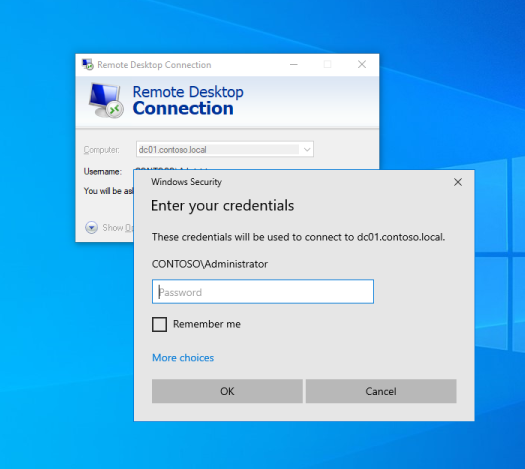
RDP Windows client
You can check if a machine is using RDP commonly by checking if ports 3389/TCP or 3389/UDP are open.
                   .----
                   |
.-----. .--- | RDP |---------->| 3389 TCP and UDP '-----' '--- | '----
RDP port
However, in order to access to that machine, the user must be member of Administrators or Remote Desktop Users local groups. Also, be careful since only a graphical session is allowed in Windows, so connecting through RDP could log off other user.
Apart from managing remotely the machine, you can use RDP to create a SOCKS proxy that allows to use the remote machine to pivot across the network by using SocksOverRDP or freerdp with rdp2tcp.
You should also keep in mind that when a machine is connected through RDP, the user credentials are sent over the network to the target machine (since the CredSSP provider), so users connected by RDP are susceptible of credential steeling by dumping the lsass process memory.